


GPU Power Optimization: How to Control the 40% of AI Data Center Operating Costs That Go to Power
June 25, 2026
"No matter how many GPUs you buy, there's no profitability if you can't control the electricity bill."
A single H100 has a TDP of 700W. An 8-GPU server at full load consumes approximately 10kW. Add cooling, networking, and storage, and a single AI server rack draws over 60kW.
Running a 1,000-GPU H100 cluster? Including cooling overhead (PUE 1.4), that's roughly 1.76MW of continuous power consumption. Electricity costs alone range from $50,000/month (low-cost regions) to $317,000/month (California, Europe). Same hardware, different location — a 6x cost difference.
Power costs in AI data centers are no longer just "one line item in operating expenses." They're a core variable that determines the ROI of your GPU investment.
The Power Structure of AI Data Centers: GPUs Dominate
To understand AI data center power, you first need to see how it differs from traditional data centers.
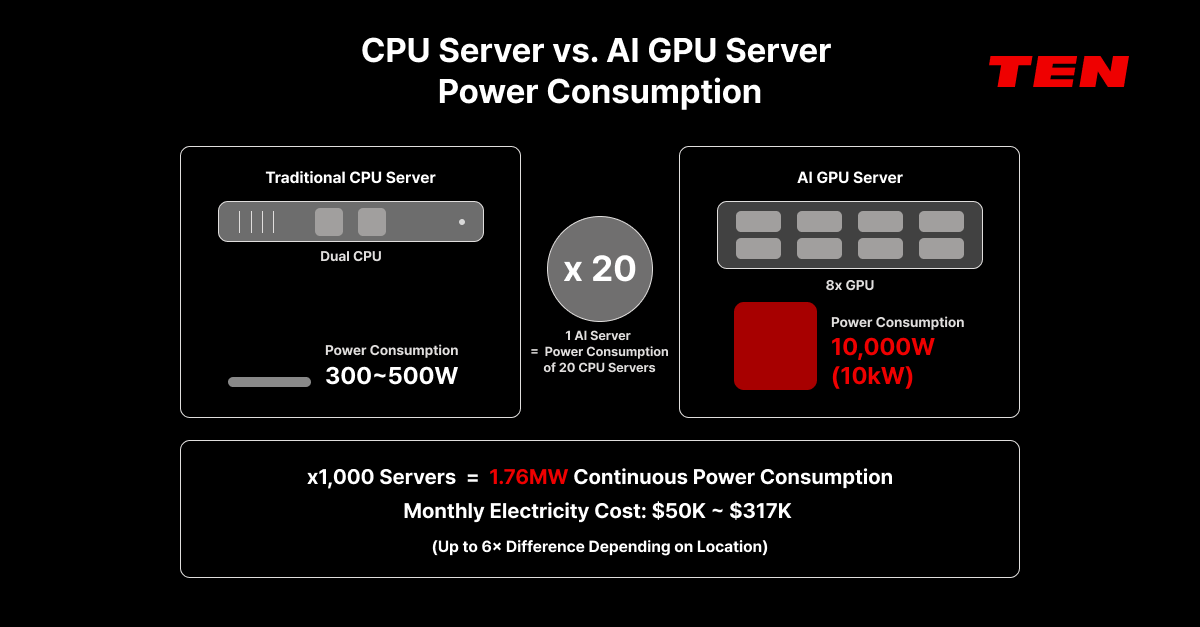
A conventional CPU server consumes roughly 300–500W. A single AI GPU consumes 700–1,200W. One GPU draws as much power as two CPU servers. And since AI servers typically house 8 GPUs, a single server reaches 10–12kW — 2–3x the power density of traditional data center racks.
And this consumption isn't intermittent.
Traditional web servers drop to low-power standby when traffic is quiet. AI training clusters, however, run at 93%+ GPU utilization continuously for days to weeks. Inference serving consumes power 24/7 as long as the service is live.
According to the IEA, global data center power consumption is projected to more than double from 415 TWh in 2024 to 945 TWh by 2030, with AI as the primary growth driver. In the United States alone, data centers already consume 4.4% of total electricity. In Virginia, 25% of the state's entire electricity goes to data centers.
The message is clear: in AI infrastructure, power is not a "secondary cost" — it's a core operational variable.
Inside GPU Power: Where Does It Go?
To optimize GPU power, you need to understand where power is consumed inside the GPU.
GPU power consumption breaks down into two main areas.
First, the SM (Streaming Multiprocessor) and compute cores. These handle matrix operations, tensor computations, and other AI calculations. In compute-bound workloads, they account for the majority of power draw.
Second, HBM memory and the memory interface. These handle data reads and writes. In memory-bandwidth-bound workloads, their share of total power consumption grows significantly. Research shows that the H200's HBM3e memory interface draws noticeably more power than the H100's HBM2e interface.
Here's the key insight: not every workload needs all the power a GPU can draw.
Most inference workloads are memory-bandwidth-bound. That means SM cores don't need to run at maximum clock speed. Lowering the SM clock reduces power, but in memory-bound workloads, performance barely drops.
The same holds for training. Recent research (Sustainable Supercomputing for AI, 2024) found that setting a GPU power cap at 200W reduced energy consumption by over 10% while impacting training speed by less than 5% — consistent across BERT, ResNet50, DimeNet, and other architectures.
The goal isn't "reduce power at all costs." It's "precisely tune power to match workload characteristics."
Three Levers for GPU Power Optimization
There are three primary ways to optimize GPU power consumption.
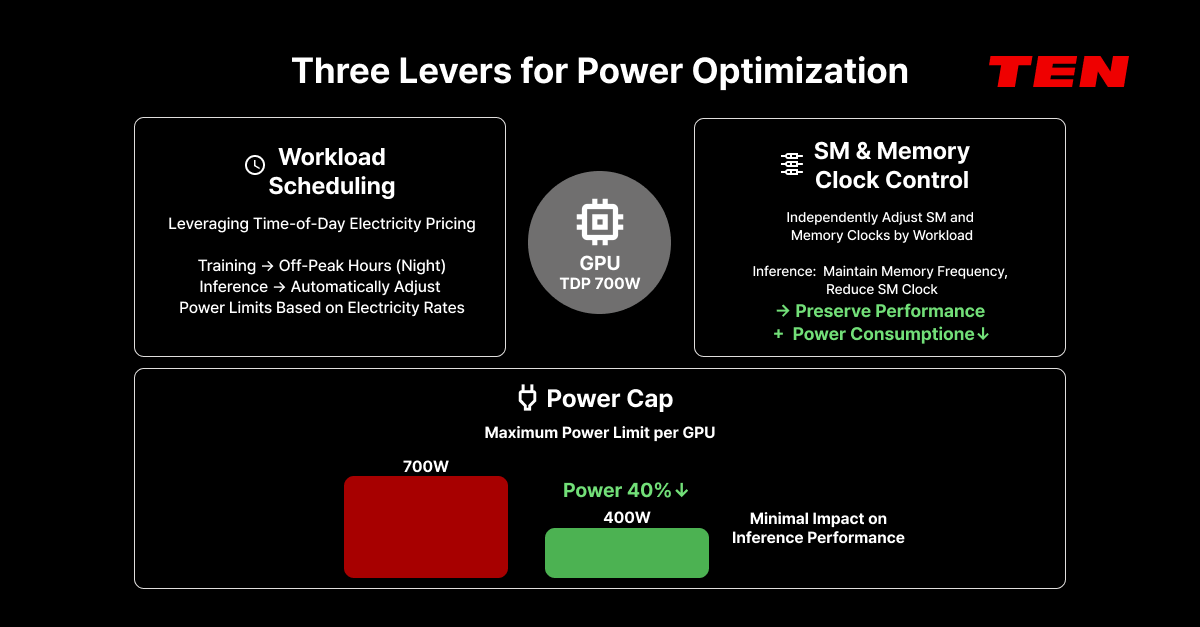
Lever 1: GPU Power Cap (per card)
The most direct approach: limit the maximum power consumption per GPU card.
For example, the H100's TDP is 700W, but setting a power cap at 400W reduces power consumption by roughly 40%. Research shows that during the decode phase of inference, throughput degradation under a 400W cap is nearly undetectable — because inference decoding is memory-bandwidth-bound.
The key: the optimal power cap varies by workload. Training (compute-bound) suffers more from aggressive power limits, while inference serving (memory-bound) can handle significant power reductions with minimal performance impact.
Lever 2: SM/Memory Clock Control
More granular than power capping. SM clock and memory clock can be adjusted independently to match workload characteristics.
For inference: lower SM clock, maintain memory clock → performance stays nearly flat, power drops. For training: maintain both clocks, manage total consumption via power cap.
NVIDIA's latest architectures (GH200 and beyond) already support "Automatic Power Steering" — dynamically redistributing power between CPU and GPU based on which component needs it more.
Lever 3: Workload Scheduling by Time-of-Use Pricing
Electricity rates vary by time of day. Leveraging the price difference between peak and off-peak hours lets you process the same workloads at lower cost.
Training jobs are less time-sensitive, so scheduling them during off-peak hours (nights, early mornings) reduces power costs. Inference serving runs continuously but can have its power cap automatically adjusted by time of day.
AIPub's GPU Power Optimization Features
TEN's AIPub integrates all three levers into a single platform.
- Per-card Power Cap settings. Set power limits individually for each GPU card from the AIPub dashboard. Not a cluster-wide blanket limit — card-by-card configuration matched to workload characteristics.
- Independent SM and Memory Clock control. Adjust SM clock and memory clock separately. For inference environments, lower SM clocks while preserving memory bandwidth for an optimal performance-per-watt configuration.
- Real-time power monitoring. Track power consumption in real time from data center → node → GPU card → container level. Over 40 custom-built metrics cover GPU utilization, memory occupancy, power consumption, temperature, PCIe traffic, and NVLink bandwidth — enabling early detection of abnormal power patterns.
- AIPub Helper: LLM-driven anomaly detection. AIPub Helper periodically scans the system and uses LLM analysis to automatically surface root causes and remediation steps for power-related anomalies such as abnormal consumption patterns or temperature spikes.
The Real Impact: A Cost Simulation
Let's put concrete numbers to power optimization.
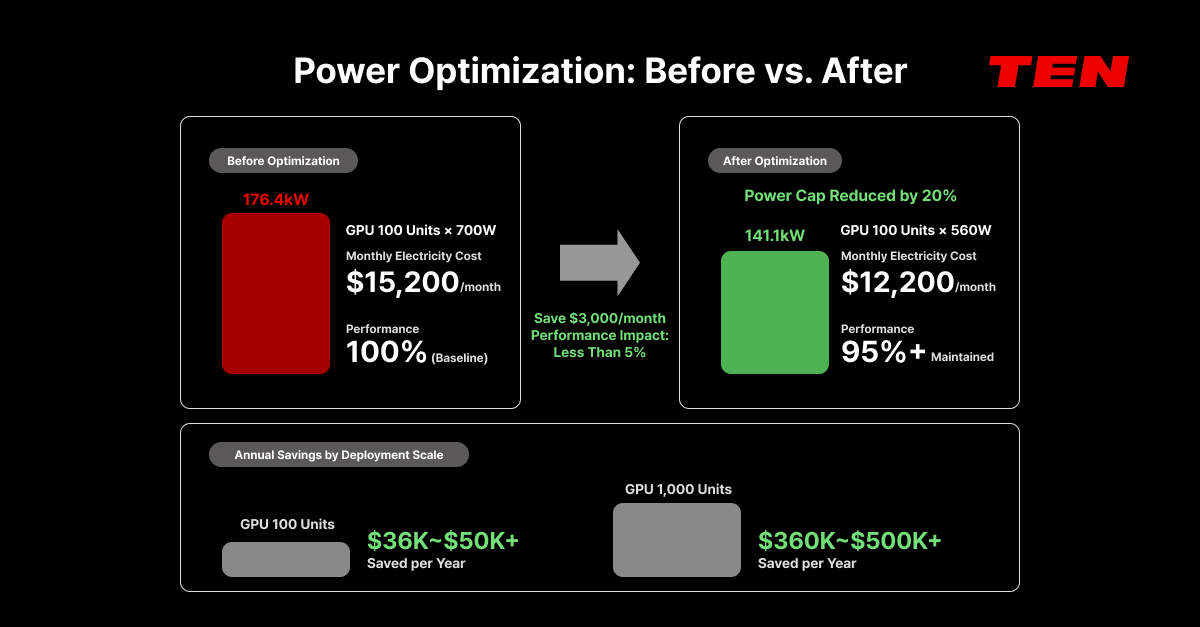
Scenario: 100x H100 cluster, 24/7 operation, US median electricity rate ($0.12/kWh), PUE 1.4.
Before optimization (baseline): GPU power: 100 × 700W = 70kW → Server overhead (1.8x): 126kW → PUE (1.4x): 176.4kW Monthly power cost: 176.4kW × 720h × $0.12 ≈ $15,200/month
After 20% power cap reduction (700W → 560W): GPU power: 100 × 560W = 56kW → Server overhead: 100.8kW → PUE: 141.1kW Monthly power cost: ≈ $12,200/month Savings: ~$3,000/month, $36,000/year
Add off-peak scheduling for training workloads: If peak/off-peak rate difference is 30%, shifting 60% of training jobs to off-peak adds roughly 15% additional savings.
At 100 GPUs, that's $36,000–$50,000+ in annual savings. At 1,000 GPUs, it's $360,000–$500,000+. And this is achieved within a performance impact of less than 5%.
Compare "buy one more GPU" versus "optimize existing GPU power" — the ROI of power optimization becomes obvious.
Smart Grid Integration and Carbon Tracking: AIPub's Roadmap
AIPub's power optimization vision extends beyond individual GPU card control.
- Smart Grid integration. AIPub is designed to automate workload scheduling based on time-of-use electricity pricing data. Concentrate training jobs during low-rate periods, and automatically apply low-power inference settings during peak hours.
- Per-workload carbon emission tracking. The EU AI Act's energy consumption disclosure requirements are being phased in starting 2026, and more organizations need to include AI infrastructure carbon emissions in their ESG reporting. AIPub is designed to extend into carbon emission tracking based on per-workload power consumption data.
Power Optimization Checklist
Assess your organization's GPU power management maturity:
✅ Are you setting per-card power limits matched to each workload?
✅ Are you tuning SM and memory clocks based on workload characteristics?
✅ Are you tracking power consumption in real time from data center to container level?
✅ Can you attribute power costs by team and project?
✅ Are you leveraging time-of-use pricing for workload scheduling?
If any answer is "no," there's a good chance your GPUs are plentiful but profitability is leaking through power costs.
Power optimization is both a cost strategy and an ESG strategy. Precise GPU power control reduces operating costs and carbon emissions simultaneously — without sacrificing performance. That's what Responsible Computing truly looks like.
To assess your GPU infrastructure's power efficiency, RA:X's benchmark-driven consulting can help you identify — with data — which GPU configuration delivers optimal performance per watt.
Don't navigate this alone. Design your GPU power optimization strategy with TEN's experts.
👉 Learn more about AIPub
👉 Explore RA:X consulting
📩 Talk to an expert